
General
Shipment icons
Visual refreshment of shipment icons: Coloading as well as SubMaster/SubHouse icons in Air/Ocean Export/Import overviews and Home View.
Simple Shipment and Booking icons refreshed in Home View.
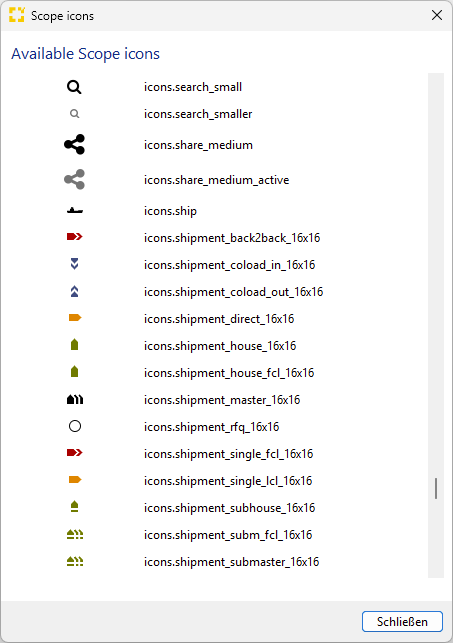
Overhauled Scope Icon overview available under Settings > System Settings > General > Scope icons.
Denied Party Screening
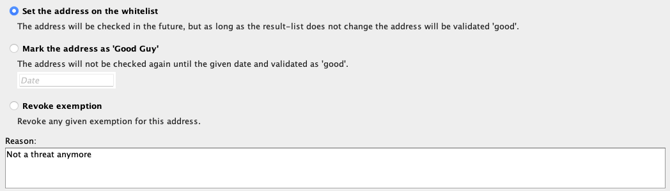
Dialog to set a Denied Party Exemption now sports a free text remarks field which allows the user to document an exemption reason.
Air
Airline Export
New option added to Master Data > Airfreight > Consol Flight Schedule Templates to create a new template from the selected row via New menu.

Ocean
Sea Export FCL Precarriage and Freetime Handling on General Tab
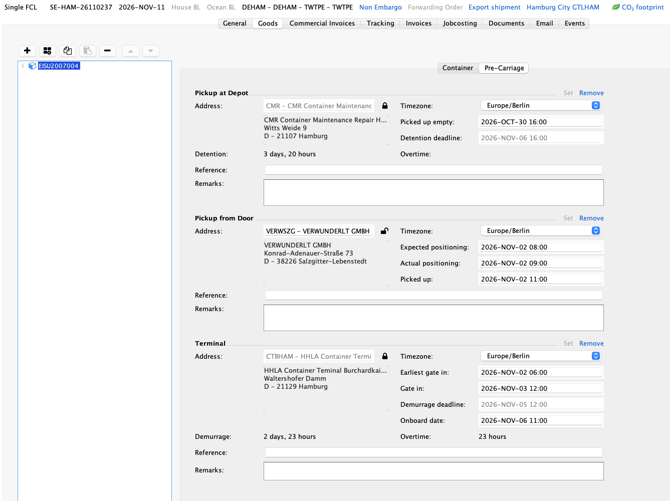
We have completely redesigned the precarriage tab within the goods tab now showing the three main stages:
-
empty container pickup
-
cargo pickup from door
-
container delivery to terminal
with more details, automatic updates from inbound events as well as freetime calculation on container level pre-defined by user on the general tab.
Sea Carrier EDI/Depot-Mapping
We have introduced a new EDI-Profile “OCE” to give users or admins the option to maintain depot/terminal-mappings for unmapped depots and terminals received by carrier booking confirmations. This enables the existing function “map one-time address to partner” also for container depots and container terminals.
Additional insights about this topic:
How can I do Container Depot and Container Terminal-Mapping by one-off addresses without UID in SeaCarrier EDI booking confirmations?
General article: How does replacing one-time addresses work in Scope?
How to map, if carrier provides UID: How can I map a Sea Carrier address to a Scope Partner?
Finance
E-Invoicing
The ZUGFeRD e-invoice format with the EN16931 profile (formerly COMFORT) has been implemented for outgoing invoices in Scope. This format complies with the legal requirements for mandatory e-invoicing in Germany. With this enhancement, Scope now supports both of the relevant e-invoice formats for invoices in Germany: ZUGFeRD and XRechnung.
The format can be enabled for e-invoice transmission by email either for an individual debtor via the debtor partner role or for all applicable debtors of a legal entity. An e-invoice format configured on legal entity level in Germany can be overridden for a specific debtor by defining a debtor-specific e-invoice format.
To enable an e-invoice format on legal entity level, please contact the Riege Service Team.
Accounts Payable Import
To support the legal requirements of mandatory e-invoicing in Germany, the Accounts Payable Import appliance has been enhanced with an automatic technical validation of imported e-invoices that are marked as compliant with the EN 16931 standard.
The validation verifies whether an e-invoice complies with the format and data requirements defined by EN 16931. Based on the validation result, a recommendation is provided on whether the invoice should be processed further or rejected. If validation errors are detected, any automation configured for the import process is automatically terminated.
Please note that this technical validation does not replace the substantive or business validation of an invoice. It is limited to verifying compliance with the technical requirements of the e-invoice standard.
Accounts Receivable
Scope already provides support for an invoice recipient's specific reference on outgoing invoices, populated from the related shipment. This reference can be used on invoice printouts, in invoice email templates, and in various reports.
To improve visibility and maintainability, the invoice recipient's reference is now available as a dedicated field in the invoice editor. 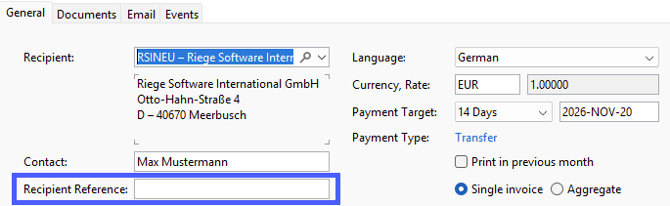
The field is automatically populated from the related shipment when the invoice is created. For aggregated invoices, the reference must be entered manually.
This reference is particularly important for e-invoicing, as its value is mapped to the EN 16931 field BT-13 “Purchase Order Reference”.
Accounts Receivable & E-Invoice Export
The invoice attachment selection, which previously controlled the documents attached to invoice emails, has been enhanced to support e-invoicing formats that allow embedded documents, such as XRechnung, ZUGFeRD, and Peppol.
Scope supports two different scenarios:
- E-invoicing is disabled for an invoice, or the selected e-invoice format does not support embedded documents: The attachment selection continues to define which documents are attached to the invoice email.
- An e-invoice format that supports embedded documents is enabled for an invoice: The attachment selection defines which documents are embedded into the e-invoice file.
As a result of this enhancement, attachments for Peppol e-invoices can now be managed through the attachment selection. Previously, Peppol e-invoices always included only the invoice printout as a fixed embedded document and did not support the configuration of additional embedded attachments.
When e-invoices are transmitted by email, as commonly required in Germany, the attachment selection determines which documents are embedded in the e-invoice, while the email itself contains only one single attachment: the e-invoice file. This ensures that recipients receive all supporting documents through the e-invoice file rather than as separate email attachments.
Accounts Receivable & E-Invoice Export
The bank account configuration on legal entity level has been enhanced to support the assignment of multiple bank accounts to an invoice.
To include additional bank accounts on an invoice, they must be marked as additional bank accounts in the bank account configuration.
When e-invoicing is enabled, bank account details must be maintained in Scope, as this information is a mandatory part of e-invoices.
E-Invoice Export
A new Invoice Notes master data configuration dialog has been introduced to manage legal and informational notes that must be included in outgoing e-invoices. This configuration replaces hard-coded text previously maintained on invoice forms, ensuring that the information shown on the PDF invoice printout and the corresponding e-invoice remain consistent and centrally maintained within Scope.
The available invoice note types depend on the country-specific requirements. For Germany, the following note types are currently supported:
-
Legal Information: Additional legal disclosures required under commercial law that are relevant to the invoice issuer company, such as information about managing directors or company registration details.
-
General Information: General legal or business information, for example references to terms and conditions.
-
Factoring Assignment Clause: Additional legal information that must be provided when invoice factoring is applied.
DE Customs
ATLAS Zolllager-Kontingentsangaben
Für die Zollnachrichten SCWDEC und SCWREC wurden Felder zur Erfassung von Kontingentsangaben ergänzt. Obwohl diese Angaben nicht Bestandteil der eigentlichen Zollnachricht sind, können diese nun bereits beim Zolllager-Eingang erfasst und nach Überlassung direkt in die Bestandsführung übernommen werden. Bei der Überführung in Folgeverfahren, beispielsweise in eine Einzelzollanmeldung oder Vereinfachte Zollanmeldung werden gespeicherte Kontingentsdaten automatisch übernommen. Dadurch stehen die Angaben während des gesamten Prozesses durchgängig zur Verfügung.
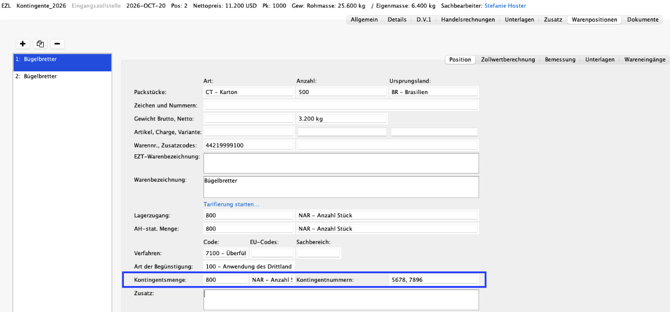
In den Vorgängen 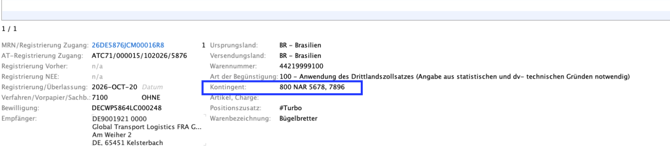
ALTLAS Zolllager
Übernahme und Anzeige von Zollmengen in der Bestandsführung:
Werden in den Zolllager-Eingangsnachrichten im Reiter „Bemessung“ Zollmengen erfasst, werden diese nun in die Bestandsführung übernommen und dauerhaft zum Bestand gespeichert und bei der Überführung in Folgeverfahren automatisch übernommen.
Zur besseren Übersicht wurde in der Bestandsführung zudem ein eigener Reiter „Zollmengen“ ergänzt. Dort werden die zu einer Position gehörenden Zollmengen übersichtlich dargestellt.
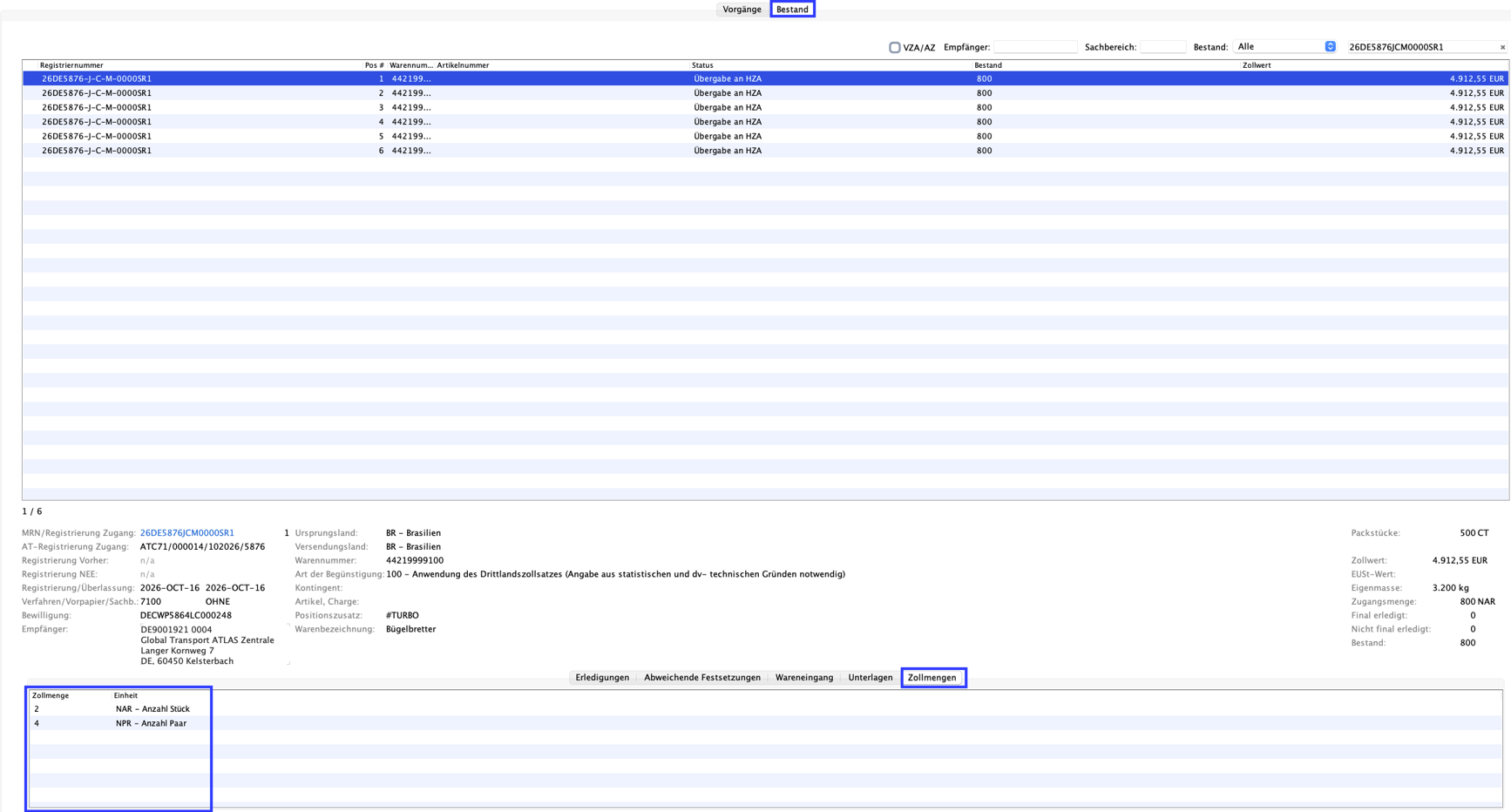
Mehrfachauswahl von Zolllagerpositionen bei der Bestandsüberführung:
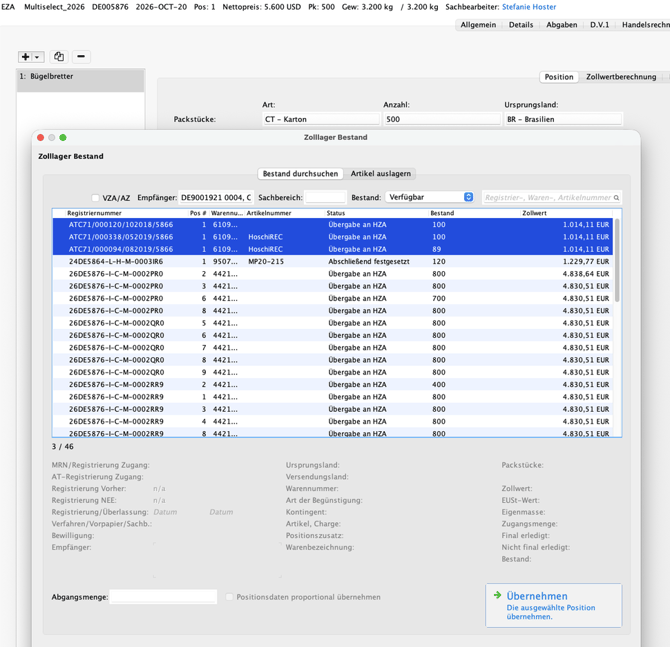
Bei der Funktion „Neue Warenposition aus Zolllager“ in Einzelzollanmeldungen und Vereinfachten Zollanmeldungen können im Auswahlfenster für Zolllagerbestände nun mehrere Bestandspositionen gleichzeitig ausgewählt und in das Folgeverfahren übernommen werden. Bitte beachten Sie, dass bei der Mehrfachauswahl keine Teilabschreibungen möglich sind.
CH Customs
Passar Einfuhr - SCI Scope Zollschnittstelle
Die SCI wurde um die Warenanmeldung Einfuhr erweitert. Die Schnittstellenbeschreibung findet sich hier: https://service.riege.com/de/knowledge/scope-customs-interface-v5
Passar Einfuhr - Chartera Input
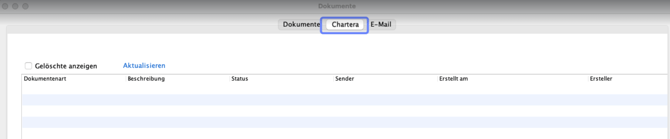
Mit Rechtsklick auf den Status einer Akzeptierten WA-E kann man die Dokumente öffnen. Dort findet sich neu der Reiter „Chartera“. Über diesen können später Dokumente elektronisch an den Zoll übertragen werden.
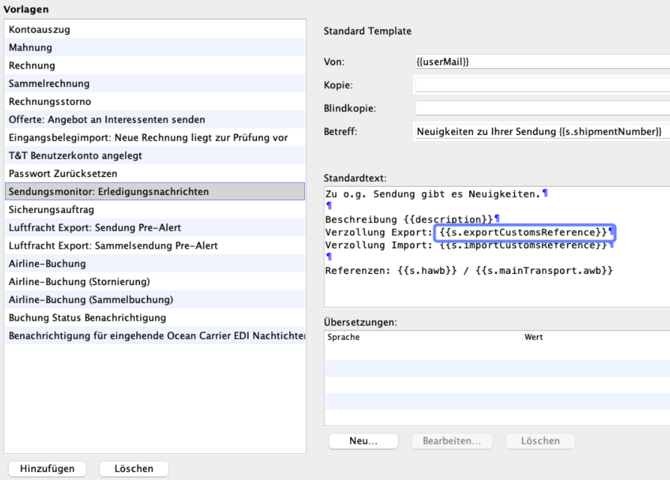
Passar Ausfuhr - Sendungsmonitor Erledigungsnachricht
Insofern man Trackingpläne und Aktionen nutzt, kann man ab sofort den Platzhalter verwenden, damit die Ausfuhr GDRN gezogen wird.
Passar Einfuhr/Ausfuhr
Wenn verschiedene Packstücke auf Sendungsebene hinterlegt sind, wie im folgenden Beispiel: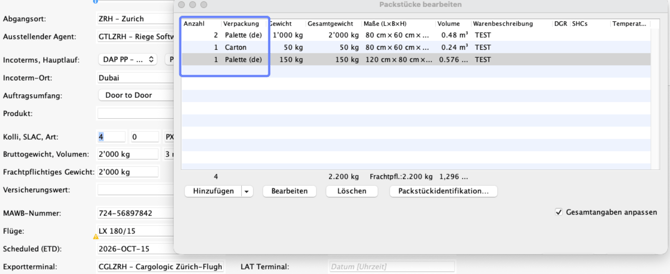
... werden diese in der Deklaration auf Positionsebene übernommen.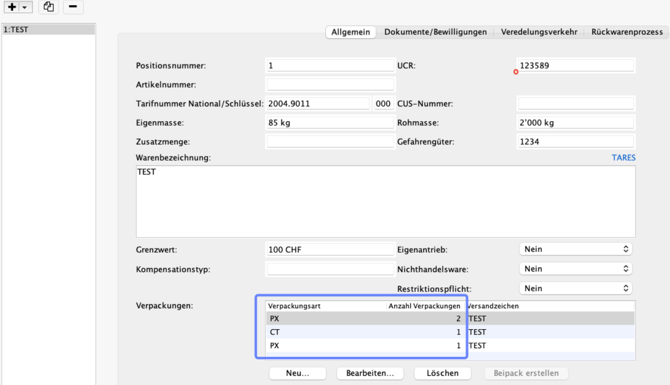
Passar Einfuhr Stammdaten
Die GP-ID können in der Rolle BAZG Teilnehmer hinterlegt werden.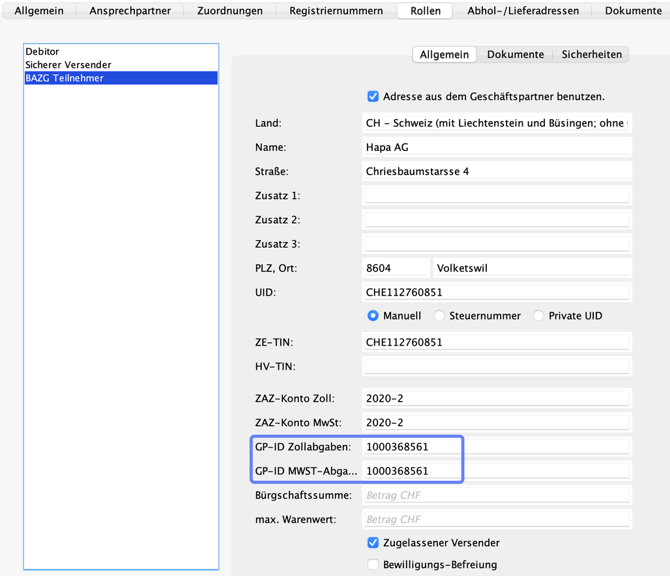
Passar Einfuhr - Homeview
Es gibt eine neue Filteroption „Handlungsbedarf“.
Passar
Die Reihenfolge der Module unter Passar wurde angepasst.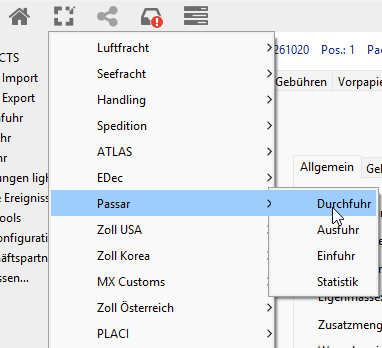
Aquí puede consultar la lista completa de cambios de la versión 26.10