
The 'Good Guy' strategy
Eligible users can set a date to exclude an address from further Denied Party Screening until the entered date. How how far into the future such a date might be set, can be configured - see How does the Denied Party Screening work?
Only users with the permission Denied Party Screening: Overrule by setting the good guy until date are eligible to set a Good Guy until date.
The ‘Whitelist’ strategy
Scope 26.4 introduces an alternative and smarter option to handle false positives. After a click on “Check address and display similar addresses”, a list of address matches from denied lists along with their similarity percentage beyond the threshold are displayed in Scope. Here, you can also access detailed information related to the sanctions list screening for the selected address. After ensuring the address match is indeed a false positive, eligible users can 'whitelist' the Scope address:
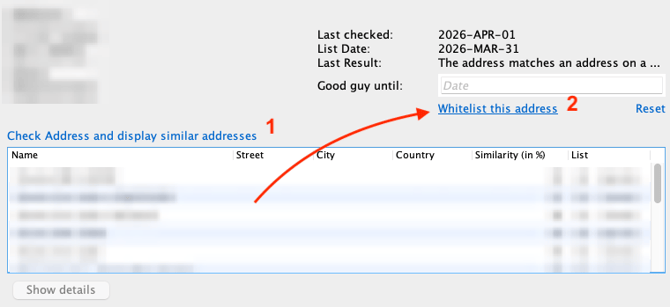
Whitelisted address are not excluded from checking against the sanctions lists but are included in all further automatic or manual checks but with a different logic:
In the moment of adding an address to the whitelist, Scope stores the full check result, including all matches beyond threshold with their similarity percentage results and sanction list entry.
Whenever an automatic of manual check detects a whitelisted address, Scope performs the detailed similarity search/check again and raises an alarm if and only if the result deviates against the stored result. Changes in the sanction lists that affect whitelisted address search results will make the address get removed from the whitelist and ensure a new user evaluation. Changes in sanction lists without any relation to the whitelisted address raise no alarm.
Major advantages over ‘Good Guy’ strategy is continued automated checking of whitelisted address and elimination of manual re-check the same address with same match result after some days. Re-checking is limited to changes in address or change on the match result against the sanction lists.
The whitelist feature requires a new permission Denied Party Screening: Whitelist.
General behavior
Both strategies, ‘Good Guy’ and ‘Whitelist’ share the following functionality:
-
If the address is changed in Scope, the address is reset by Scope automatically.
- An address can only be whitelisted or flagged as GoodGuy, not both.
- The 'Reset' option removes either the address from the whitelist or the GoodGuy until date.
- When applying whitelists or good guy to an address, a log entry with timestamp is added to Monitoring > Denied party Screening Events in the corresponding category.