
This article covers only some of the requirements for creating valid outgoing invoices in e-invoice format for German customers. For a complete overview, please read our guide: Guideline for E-Invoicing in Germany
The “Via EDI-I-Invoice Appliance” section requires an additional permission, as the Riege service team must be involved in configuring this option.
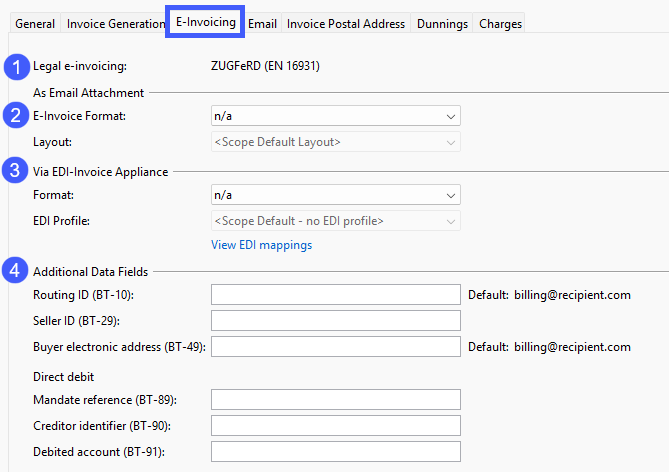
At the very top (1) the legal e-invoicing format configured for your company is displayed. If no alternative format is selected under (2) or (3), your customer will receive invoices in this format. No further action is required.
If your debtor in Germany requires outgoing invoices in a different format, for example XRechnung instead of ZUGFeRD, you can select that format under (2) or (3), depending on the preferred transmission method. This overrides the default legal e-invoicing format for that debtor.
Scope supports the following two communication channels for transmitting e-invoices:
-
(2) Email attachment: E-invoices are automatically attached to invoice emails
If sending automatic email is not enabled, no email will be sent. You can find the outgoing invoice in the “Documents” tab.
If you want to activate sending mail automatically, please refer to: How can I set a debtor for automatic email invoicing? -
(3) Dedicated data transfer: E‑Invoices are transmitted through a dedicated channel, such as SFTP. To improve traceability and enable additional functionalities like delayed transmission, these invoices will be displayed in a specialized e-invoice appliance. For the implementation of this channel, please contact the Riege service team, as the data transfer must be configured individually by Riege.
An e-invoice format allows and requires you to configure certain additional recipient-specific data fields (4). The field identifiers in parentheses refer to the corresponding fields in the European e-invoicing standard EN-16931.
The mandatory fields (BT-10 and BT-49) are defaulted with the email address of the contact assigned the invoice recipient role. If no contact is assigned the invoice recipient role, Scope uses the email address listed under Contact Details on the General tab instead.
You can override these default values by entering the information manually in the corresponding field.
-
Routing ID (BT-10), mandatory: An identifier assigned by the invoice recipient (buyer) used for internal routing purposes. Typically, an email address
-
Seller ID (BT-29), optional: An identification of the seller usually assigned by the invoice recipient (buyer), such as the creditor account number or a supplier number of the ordering system.
-
Buyer electronic address (BT-49), mandatory: The invoice recipient’s (buyer's) electronic address to whom the invoice is delivered. Typically, an email address
Would you like to see which of your existing partners are ready for e-invoicing and which still need to be configured?
For more information, see the following article: Which of my debtors in Germany are ready for e-invoicing?
For the payment method Direct debit additional information must be provided in the following three mandatory data fields.
- Mandate reference (BT-89): Field for the mandate reference number.
- Creditor identifier (BT-90): The unique identifier of the creditor (invoice issuer).
- Debited account (BT-91): A valid and unmasked IBAN is required to use SEPA direct debit in the e-invoice. Otherwise only direct debit will be used in the e-invoice.
To utilize the payment method “Bank Transfer” for outgoing invoices with E-Invoicing, please ensure that your bank account details are entered in Scope beforehand. For guidance on how to manage your bank accounts in Scope, refer to the following resource: How do I manage our (own) bank accounts in Scope?