
To prepare a debtor for sending e-invoices, the “Routing ID (BT-10)” and “Buyer electronic address (BT-49)” fields must be filled in.
Scope can populate these fields automatically, if at least one of the following conditions is met: The partner has a contact with an email address to whom the role "Invoice recipient” is assigned to or an email address is entered on the partner’s General tab under contact details.
For detailed instructions on configuring your debtors for e-invoicing, see the following article: How do I set up e-invoicing in Scope for a debtor?
Follow the steps below to filter your partners for debtors whose two required fields are still empty.
Navitage to Master Data > Partner
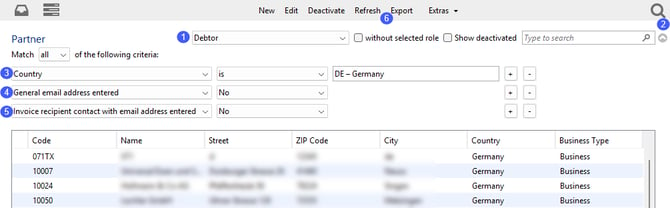
Filter your partners to show only debtors (1), then click the expand arrow (2). Apply additional filters to show partners in Germany (3) that have neither a general email address (4) nor an invoice recipient contact with an email address (5).
The table now shows all partners for which Scope cannot automatically populate the required “Routing ID (BT-10)” and “Buyer electronic address (BT-49)” fields.
To exclude debtors whose “Buyer electronic address (BT-49)” field has already been filled in manually, click Export (6) at the top. In the exported file, filter column AY to show only rows where no buyer electronic address has been entered manually.
For the remaining partners, update the master data as described in the article linked in the green box above.
For reference, you can also review the following columns in the exported file, which are particularly relevant to e-invoicing:
| Colum | Description | Explanation |
| AR | Debitor Payment Type | This column shows the configured payment method. |
| AX | Debitor E-Invoice-Format | This column shows the configured e-invoice format. |
| AZ | Send Invoices by email | This column shows whether automatic emailing of outgoing documents is enabled for this partner or not. |