
General
Task management
Keep track of user and team tasks directly in Scope. Jump to related entities.
Task management feature is now active by default after the finishment of the piloting phase.
See https://service.riege.com/en/knowledge/task-management for details.
Start up Tasks

In the Scope main view, click on the  or the
  symbol. Clicking the symbol opens a dialog showing tasks.
Order tracking
Added “is/is-not Booking” applicability filter. It is recommended to use this new filter only on Milestones, not on Tracking Template applicability.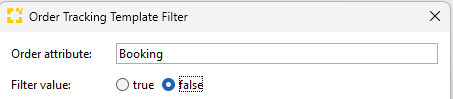
This feature supports to create tasks automatically for the phase when a shipment is still a booking or for the phase after a booking became a shipment.
See https://service.riege.com/en/knowledge/how-can-tasks-be-created-automatically for details.
Air
Airfreight Security
Add a new document type for EU air security risk analysis (“Risk analysis” / “Risikoanalyse”)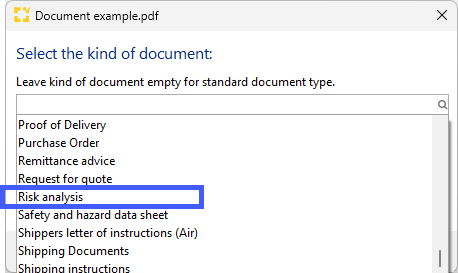
This feature supports the upload of documents related to new EU air security regulations on shipment level. Adding an explicit document type allows to complete milestones in Order Tracking depending upon upload of this specific type.
See https://service.riege.com/en/knowledge/how-to-automatically-complete-order-tracking-milestones-via-documents for details
eAWB
If a screening order has been issued for an air export shipment,
old: Formerly the eAWB contained
-
Field content of “Additional Security Information” from Security History and
-
Screening instructions from the screening order.
new: This has been changed to include in the eAWB:
-
Field content of “Additional Security Information” from Security History (unchanged) and
-
Additional Security Information (formerly named Screening Remarks) from the screening order result.
Ocean
Sea Import Master, Houses and TransportOrders
Sea Import Master now includes container movement type: Delivery to door. 
By adding these Dates on either master or house, when creating a new delivery order, the planned container delivery time will be defaulted from there. 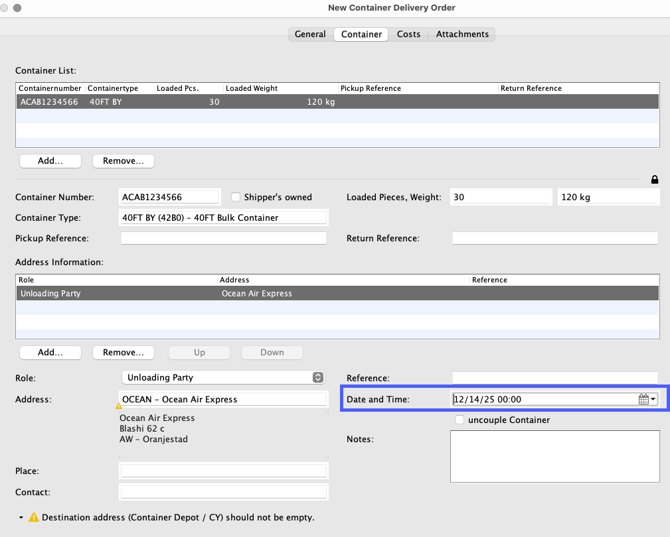
Otherwise the time will be defaulted from the house's requested date of delivery.
Arrival Agent (in Seafreight Import)
The arrival agent partner field is now restricted to partners that have the role “liner agent” only. This is an alignment with the behavior in sea export.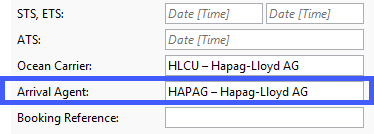

Finance
E-invoicing
A new interface has been implemented to enable sending and receiving e‑invoices via the Peppol network for Scope branches in Belgium, ensuring compliance with national e‑invoicing regulations.
To send e‑invoices Peppol participant IDs must be maintained in the field buyer electronic address (BT‑49) on the debtor role of the partner. 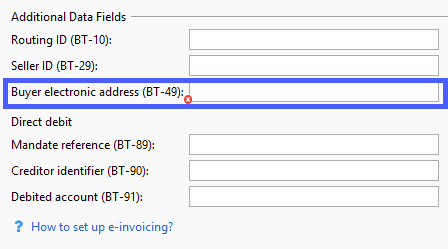
The corresponding red validation error is: Profile Debtor: The buyer electronic address (BT-49) must be a valid Peppol participant ID, when the e-invoice format VRBL Peppol BIS Billing 3.0 (Peppol transmission) is active.
When an outgoing invoice is issued, its status will temporarily appear as “finish pending” until confirmation is received from the Peppol service provider. Incoming e‑invoices from the Peppol network are automatically imported into the Accounts Payable Import appliance in Scope. Additionally, users can configure an email notification to be informed whenever new Peppol e‑invoices are received.
To configure an email notification, please contact the Riege Service Team.
The new Peppol interface has also been backported to Scope release 25.10 to ensure general availability on Jan. 1st.
Accounts Payable Imports
When Scope is connected to an e‑invoicing network such as Peppol, all incoming invoices are automatically retrieved and imported into the Accounts Payable Import appliance. However, some invoices - typically administrative cost invoices - should not be booked in Scope and instead belong in an external system, such as an accounting system. In addition, these external invoices often should not be visible to all Scope clerks. To support these evolving requirements, the Accounts Payable Import appliance has been enhanced.
At the customer’s request, an invoice classification function can be activated. Scope distinguishes between invoices that must be booked in Scope and those that should not.
When classification is enabled, Scope attempts to automatically identify invoices that must be booked in Scope. This is done when a vendor partner with a creditor role has been matched and/or when the invoice could be matched to an order in Scope. Such invoices are assigned the familiar status Open.
Invoices that are intended for an external system must be marked as Not for Scope. Once marked, these invoices cannot be booked in Scope. They can still be downloaded from the document tab of the Accounts Payable Import editor or forwarded via email using the email tab, in the respective local e‑invoice format (e.g. Peppol BIS Billing).
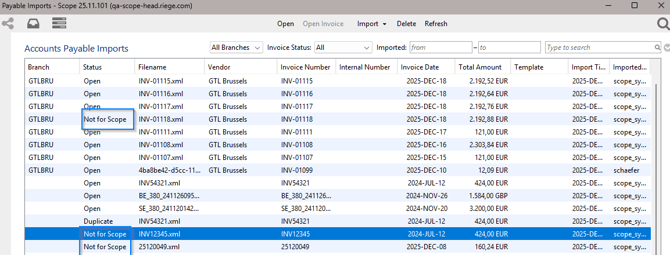
The email address autocompletion offers all contacts maintained on the current branch partner, making it easy to forward such invoices to the correct external team or system.
Optionally, access to invoices that have not yet been classified or that are intended for external systems can be restricted to selected users via a new permission. This ensures that not every clerk has access to non‑operational invoices.
To activate invoice classification, please contact the Riege Service Team.
Please read the linked article information: How to handle incoming E-Invoices that should not be processed in Scope?
Aggregated Invoices
Scope now supports the creation of aggregated outgoing self‑billing credit notes within the Aggregated Invoice appliance.
The appliance introduces a new workflow that allows users to generate outgoing self‑billing credit notes based on cost estimates from multiple orders. Depending on master data configurations, Scope automatically aggregates cost estimates per partner into new entries of the type “Self‑Billing Credit Note” shown in the upper table of the appliance. These can be converted into new outgoing self‑billing credit notes using the lower table.
To activate the feature and ensure that only applicable entries are available for the creation of self‑billing credit notes, the following configurations must be changed:
-
Charge type activation: A new option is available in the Charge Type editor to mark a charge type as eligible for aggregated outgoing self‑billing credit notes. This setting is stored on legal‑entity level.

- Creditor activation: The creditor profile has a new configuration option that designates the creditor as eligible for aggregated outgoing self‑billing credit notes.
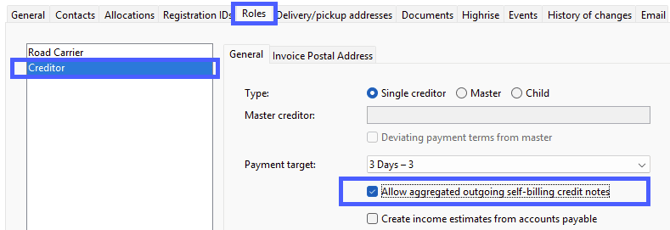
Both settings need to be active for a given charge type to be self-billed to a given creditor.
Aquí puede consultar la lista completa de cambios de la versión 26.0