When Scope is connected to an e‑invoicing network (e.g. Peppol, KSeF), all incoming invoices are automatically retrieved and imported into the Accounts Payable Import appliance. However, some invoices - typically administrative cost invoices - should not be booked in Scope and instead belong in an external system, such as an accounting system. In addition, these external invoices often should not be visible to all Scope clerks.
Scope therefore offers a classification function to automatically filter out invoices not intended to be booked in Scope as well as a manual option to declare invoices as “Not for Scope”.
The classification function automatically attempts to identify invoices that must be booked in Scope. This is done when a vendor partner with a creditor role has been matched and/or when the invoice could be matched to an order in Scope. Such invoices are assigned the familiar status Open and are visible to every clerk.
All invoices that could not be matched automatically will be assigned the status “Pending classification”.
Access to invoices that have the status “Pending classified” and “Not for Scope” can be restricted to selected users via a dedicated permission. This ensures that not every clerk has access to non‑operational invoices.
To activate invoice classification, please contact the Riege Service Team
You can choose if either a creditor role OR an order have to be matched or whether both, a creditor role AND an order have to be matched to trigger an automated classification.
If you do not want to make use of the automated classification, you can still manually check imported invoices and decide to choose to process them externally and set the status “Not for Scope”.
You can do that in bulk for multiple invoices at once or one by one.
One by one:
Open the Accounts Payable Import (E-Invoice) and choose “Process Externally”. Scope will prompt you to enter a note, where you can document your comments.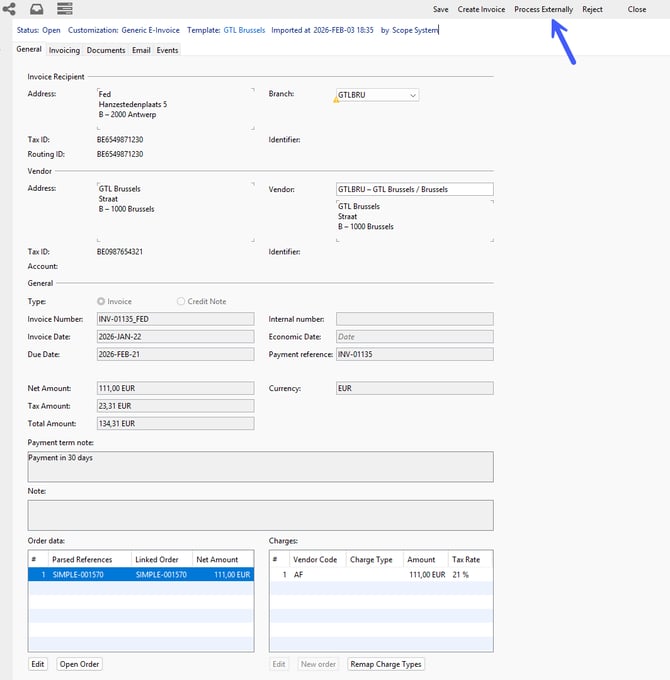
Scope will then set the E-Invoice status to “Not for Scope”.
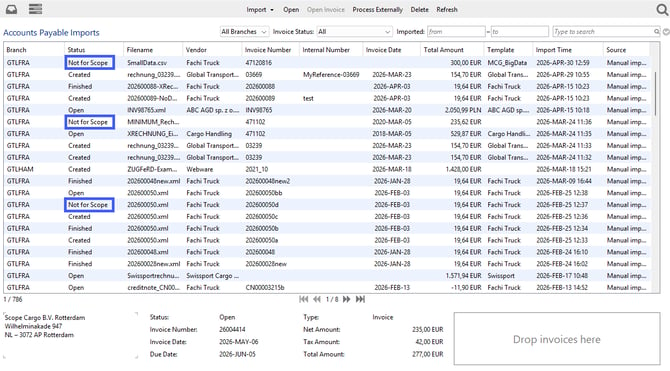
Once marked as “Not for Scope”, these invoices cannot be booked in Scope.
To continue processing this E-Invoice in an external application,
-
open the Documents tab of the E-Invoice, select the “Accounts Payable” document, save it locally, and then import or further process this file in your external application
or - compose an email and attach the “Accounts Payable” document. All contact persons of your branch partner are available for automatic email address completion.
Bulk option for multiple invoices
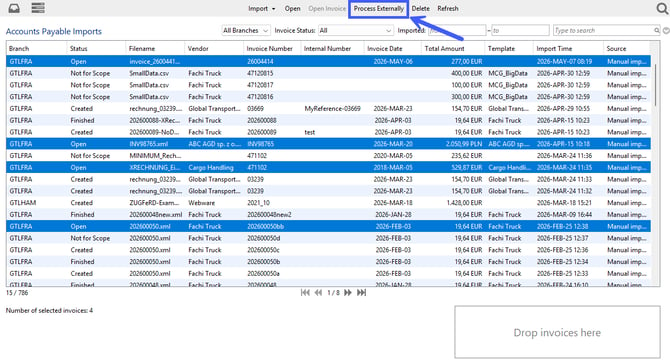
Select multiple invoices in the overview by holding down the Strg. key and then select “Process Externally” in the menu bar. You will be asked to select a location where to save the zip. file. Once selected, click save and the zip. file, containing all related documents, will be downloaded.
The status will change to “Not for Scope” only after a successful download.