
Changelog
 = New feature
 = Enhancement
 = Bug fix
|
Type |
Area |
Description/Note |
| |
Upgrade Scope Runtime to 17.15.0 |
Scope runtime for MS Windows Server does not update itself automatically. Updates must be performed manually by a system administrator. |
| |
Shipment overviews (order tracking) | The display of the order tracking in all overviews has been improved. Milestones are now grouped into categories for a better overview. 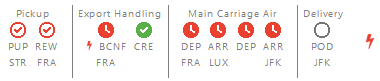 |
| |
Tasks & Tracking Templates | Tasks and Order Tracking: Allow to create a new task upon milestone completion. |
| |
Tasks & Tracking Templates | Tracking Template: Add task creation action on alarm trigger |
| |
UI/UX | Improved UI for package field ‚stackability’ with more meaning |
| |
Shipment Copy | A warning appears when copying a shipment if a partner is invalid. |
| |
Wink CC / Transportorder | The transportorder xml interface has been enhanced (Version 1.17) to allow transmitting address data for the trucker. |
| |
Road Carrier for AirSea | List of inland carriers can be exported with additional data for minimum wage law and transport insurance coverage. |
| |
Transport Order Air+Sea | Improved handling of defaulted pickup and delivery time windows from shipment data when switching the pickup or delivery address by F7. |
| |
Tracking Template | “New” button missing for events and applicability on freshly created new templates |
| |
Shipment Filter Maintenance | The + - buttons for adding/removing filter criteria are displayed without the user has to widen the window. |
|
Type |
Area |
Description |
| |
Airline Messaging Premium | Added new Airline Messaging Premium feature. Subscription is possible for air export and air import tracking. Pilot/beta phase started. Find out more: https://service.riege.com/en/knowledge/reliable-automatic-tracking-for-air-freight-main-carriage |
| |
Air Freight Booking Portal | Air Freight Booking Portal: Apply „LAT Terminal“ timestamp from booking confirmation to shipment if provided by airline. |
| |
Air Freight Booking Portal | Air Freight Booking Portal: Add checkbox to capacity-query to deliver cargo (un) secured. Expected impact is improvement on fee precision as well as visibility of more available flight options. |
| |
Air Security | RegB Partner Profile: Fix some fields editable even for user having only view permissions. |
| |
Airline Messaging | E-freight and airline messaging: Added a warning for nature of goods plus HS codes being too long in eAWB. |
| |
Airline Messaging | Automated flight data update from airline messaging: support for STD/STA and Lufthansa LAT/TOA additional to ETD/ETA. |
| |
Smaller improvements and fixes |
|
|
Type |
Area |
Description |
| |
Bill of Lading / Forms |
When defining new B/L layouts (HBL/BL instructions), it is now possible to flag them as standard forms by a new checkbox. Flagging forms will result in not adding an organization specific code to the form names (and mime types). |
| |
Portbase / Events |
When receiving Portbase webhook events, which contain gate-out times for containers, for each such information a new MLI event of type GATE_OUT (corresponding to a generic FCL event of type “ACT_TERMINAL_OUT”) will be generated. |
| |
Clearing Center Ocean |
Logging on received ocean event messages has been improved, so that now all container numbers, ISO container types, B/L and booking numbers will be logged. This allows easier search for messages. |
| |
Scope Sea Import Container Editor View | On FCL Sea Import Shipments, in the container section, a new tab was created to separate the container movements from the general container properties |
| |
Portbase | With this change the shipment number is now visible inside the CargoController WEB UI. |
| |
House B/L | We have removed hard-coded B/L but ensure that user can open B/L from past shipment even if they were hard-coded ones. |
| |
Master Data Ocean | We have enhanced the container type code list by G4, P6, U6, V3 which can be combined with any size like 22, 42, 45; |
| |
Sea Export | It is no longer required to discouple a superhouse (FCL+LCL) shipment from a consol master for adding and removing subhouse-shipments. |
| |
e-Mail templates Transport Order | Missing container numbers will no longer be indicated as undisclosed if not known. |
| |
Transport Order Simple Shipment | Both types pick up order and delivery order will take over requested pick up time and requested delivery time. They shall be favored over the main transport order printed from the print menu. |
| |
Sea Export Consol Master | Printing of Container Release document (FCL only) has been enabled |
| |
Sea Export | Printing of Loading List document has been enabled on superhouse-FCL-shipment. |
| |
Pre-alert Air+Sea Import & Update | Display of pre-alert in status line if a shipment has been created from a pre-alert and an asterisk as an indication if an update has been received for taking over. |
| |
Security Manifest Filing / Carrier Booking Export | If a carrier booking confirmation via INTTRA holds the vessel data IMO number it will be stored for usage in the Security Manifest Filing. |
| |
Container Type Master Data | An ISO 6346 group code or type code is mandatory for adding any new container or when maintaining an existing container type. |
| |
Prealert / Validation | Before transmitting (external) seafreight prealerts from a Scope system, Scope will validate that all containers defined on the shipment / master have a defined ISO type code. If not, the transmission will be prevented and an error message is displayed. |
| |
Prealert | Fixed a bug on a specific external prealert format about LCL houses being imported as FCL houses. |
| |
Security Manifest Filing | The times in the log list are displayed with the local time of the branch rather than the US-Pacific time in the past which caused confusion as filings we confirmed earlier than the initial order was sent. |
| |
Portbase MED | Changed handling of inbound TA07 messages, which cannot be linked to an existing (outbound) M114 message: Write a message in EDI event and discard message instead of throwing an exception. |
|
Type |
Area |
Description |
| |
ATLAS allgemein | Wir haben eine Prüfung implementiert, die es ermöglicht, den AEO Status oder eine Sicherheitserklärung der eigenen Geschäftspartner zu prüfen. Weitere Informationen: https://service.riege.com/de/knowledge/prüfung-auf-aeo-und-sicherheitserklärung |
| |
SCI - Scope Customs Integration | Das Mapping für ATLAS AV wurde um den Bewilligungsantrag erweitert. Zusätzlich wurde das Mapping für ATLAS AV BE-Anteile erweitert. Es können nun alle Angaben in der SCI-XML Nachricht übermittelt werden. |
| |
SCI - Scope Customs Integration | Die Scope Customs Integration Schnittstelle (SCI) wurde um die Eingangsanzeige in ATLAS NCTS erweitert. Es ist nun möglich eine E_DES_NOT über die SCI-Schnittstelle anzulegen bzw. automatisch an den Zoll zu senden. |
| |
SCI - Scope Customs Integration | Ausgehende SCI-XML Nachrichten (customsOrder) erhalten nun eine nummerischen Suffix, um eine eindeutige Zuordnung im empfangenden Zollsystem zu gewährleisten. |
| |
SCI - Scope Customs Integration | Bei einer bestehenden Anbindung zwischen Scope und eCustoms von Descartes (Zoll UK) können nun Zoll-Events an Scope übertragen und in der Sendung verarbeitet werden. |
| |
ATLAS AES | Das Einheitspapier des ATLAS AES Notfallverfahrens wurde nach den Vorgaben der ATLAS-Teilnehmerinfo 666/24 angepasst und kann ab sofort verwendet werden. |
| |
ATLAS AES | In ATLAS AES wurde die Funktion „Drucken - T2L/T2LF“ entfernt, da die Abgabe dieser Formulare nur noch in elektronischer Form erlaubt ist. |
| |
Forwarding → Customs | Die Auswahl des Zollverfahrens innerhalb einer Sendung wurde alphabetisch sortiert und nach Land gruppiert, um eine effektivere und schnellere Orientierung zu gewährleisten. |
|
Type |
Area |
Description |
| |
Ausfuhr | Es gibt neu zwei Felder (Gesamteigenmasse/Gesamtrohmasse) auf der Registerkarte Warensendung welche das Verteilen und Kontrollieren der Gewichte auf Positionsebene unterstützen sollen. |
| |
Ausfuhr |
Neue Nachricht NE132 - Anfrage Daten für (Fremd) WA-A. Diese neue Nachricht ist kein Muss, sondern eine Hilfestellung. |
| |
Durchfuhr | Neu können selbst erstellte WA-Ds sowie WA-nDs aus einer Liste in der Transportanmeldung ausgewählt werden. |
| |
E-dec Bordereau | In der Rolle EZV Deklarant des eigenen Geschäftspartners Reiter Download kann für das Bordereau eine Emailadresse hinterlegt werden. |
| |
SCI - Scope Customs Integration | Die SCI wurde erweitert - sodass auch Ankunftsanmeldungen per SCI übertragen werden können. |
| |
Generell | Wenn eine Intervention einläuft, wird dies mit einem schwarzen Symbol besser dargestellt. |
| |
Generell | Ab sofort gibt es neue Berechtigungen, mit denen die Nutzung von Passar deutlich feiner gesteuert werden kann. |
| |
Ausfuhr | Wenn via Sendung eine NC123 (Aktivierung) erstellt wird, wird diese neu im Modul Passar Ausfuhr angelegt und nicht mehr im Modul Durchfuhr. |
| |
Ausfuhr | Auf Positionsebene ist es möglich, Dokumente auf alle Positionen zu verteilen. |
| |
Ausfuhr | Der ganze Bereich Bewilligungen wurde überarbeitet. |
| |
Ausfuhr |
Die Regel NS30184 wurde umgesetzt. Zusatzcodes werden in bestimmten Fällen vorbelegt. Luftfahrzeuge: W1107 wird eingetragen - Scope zieht automatisch W1104 Wasserfahrzeuge: W1108 wird eingetragen - Scope zieht automatisch W1105 |
| |
Ausfuhr | NE021 - Rückmeldung Ausfuhr-Daten UI wurde auf Version3 angepasst |
| |
Ausfuhr | Warenanmeldung Ausfuhr wurde auf V5 angepasst |
| |
Durchfuhr |
Neu kann man in der Durchfuhr, verlinkte GDRNs mit der Nachricht NE132 den Warenwert erfragen, sodass dann der Referenzbetrag automatisch ermittelt werden kann. |
| |
Durchfuhr |
Neu wird das Feld Transitfrist in Tagen angegeben. Die Tage zählen erst nach der Aktivierung. |
| |
Ausfuhr | Es gibt neu eine Checkbox für die Taraverteilung, wenn diese aktiviert ist und wenn auf Kopfebene die beiden Gesamt-Felder gefüllt sind, dann wird bei einer Position das Brutto oder Nettogewichtsfeld gefüllt, sobald eines der beiden Felder einen Wert größer 0 hat. |
| |
Ausfuhr | Ausfuhr: Waren auf Lager ausführen Mit dem Feature werden nachfolgende funktionale Lücken rund um die Ausfuhr geschlossen: Ausfuhr “auf Lager”, Befreiungsliste, Zollausschlussgebiete, Rückerstattungen (VOC & Tabak), Nachträgliche WA-A, Eindeutige ID auf Warenposition |
| |
Generell | Rolle EZV (Deklarant&Teilnehmer) wurde umbenannt in Rolle BAZG Teilnehmer / BAZG Deklarant. Unnötige Felder (AbfertigungsortExport, DienststelleExport und DienststelleNCTS) wurden entfernt. |
| |
Generell | Es können in der Rolle BAZG Deklarant - Warnliste mehrere Emailadressen hinterlegt werden. |
| |
Generell | Der Menüeintrag „Anfrage Datentransfer edec > Passar“ wurde entfernt. Da edec Export nicht mehr genutzt werden darf. |
| |
Ausfuhr | Wenn eine Zollreferenz auf Sendungsebene (GDRN) gepflegt wird, und danach eine Aktivierung erstellt wird, wird diese GDRN vorbelegt. |
| |
Ausfuhr | Es gibt eine Funktion: Übergeben an ATLAS Einfuhr - die Berechtigung wurde umbenannt auf: Passar: WA-A Daten an ATLAS übergeben. |
| |
Ausfuhr | Wenn kein Gesamtgewicht gepflegt ist, wird vor dem Senden auch keine Warnung mehr angezeigt. |
| |
Durchfuhr | In der Warnliste Transitfrist wird nun auch der Status Unstimmigkeiten ausgegeben. |
| |
Durchfuhr | Wenn eine Transportanmeldung abgelehnt wird, kann nun auch die Begründung der Ablehnung angezeigt werden. |
|
Type |
Area |
Description |
|
|
E-Invoicing |
A new interface has been implemented to enable sending and receiving e‑invoices via the KSeF system for Scope branches in Poland, ensuring compliance with national e‑invoicing regulations. When an outgoing invoice is issued, its status will temporarily appear as “finish pending” until a confirmation is received from the KSeF system. Once confirmed, Scope will then show the KSeF ID of the invoice in a new column “Invoice ID (tax authority)” on the Accounts Receivable overview. Incoming e‑invoices provided by KSeF are automatically imported into the Accounts Payable Import appliance in Scope. Additionally, users can set up an email notification to be informed whenever new e‑invoices are received from KSeF. To activate email notifications, please contact the Riege Service Team. https://service.riege.com/en/knowledge/scope-e-invoicing-support-in-poland https://service.riege.com/en/knowledge/scope-e-invoicing-support-in-poland-limitations |
|
|
E-Invoicing |
The KSeF invoice ID is now imported into Scope for invoices received through the KSeF e‑invoicing interface. It can be displayed as an optional column on the Accounts Payable Import overview, is visible in the Accounts Payable Import editor, and is used as the file name when downloading the KSeF e‑invoice file from the Documents tab. The ID will be available only for newly imported entries. |
|
|
Tariffing |
The rounding rules for tariffs with the basis Quay Charges have been updated. In accordance with the applicable HHLA Hamburger Hafen und Logistik AG tariff, weight is now rounded up to the next full 1,000 kg and volume to the next full 1 m³. |
|
|
Accounts Payable Imports |
The email notifications for the Accounts Payable Import appliance have been updated. The following notifications are now available:
To activate email notifications, please contact the Riege Service Team. |
|
|
Partner API |
A new minor version of the Partner API has been released, introducing additional data fields while remaining fully backward‑compatible with the previous version.
Further details are available in the technical documentation: |
|
|
Accounts Receivable & payable |
The defaulting logic for payment terms on outgoing and incoming credit notes has been updated to comply with validation rules in several e‑invoice formats. For credit notes, the payment term is now set to ‘Unknown’ by default. For invoices, the payment term continues to default to the value defined in the debtor or creditor profile. |
|
|
Debtor Profile | The validation rules for PEPPOL participant IDs entered in field Buyer Electronic Address (BT‑49) on the debtor partner profile have been tightened to ensure that incorrect IDs are detected immediately. |
|
|
Sales Persons | The ‘Change salesperson’ action on Salesperson Allocations overview has been enhanced for better usability. It now applies only to the salesperson allocations currently selected. |
|
|
Reasons |
The Reason appliance has been extended with a new action ‘Finalize correction invoice or credit note’. This feature prompts users to provide a reason - along with an optional comment - when creating correction invoices. |
|
|
EDI Invoices |
The E‑Invoice appliance has been renamed to EDI‑Invoice to avoid naming conflicts with the newly implemented e‑invoicing interfaces in Scope. The EDI‑Invoice appliance displays outgoing invoices that have been transmitted to specific external recipients via a dedicated interface. These invoices typically use EDI formats, and the data is transferred via FTP. |
|
|
Accounts Payable Import |
The Due Date field is now validated as mandatory for EN16931‑based e‑invoices in the Accounts Payable Import editor. If no due date is provided in the imported data, the Due Date field becomes editable so the user can enter it manually. EN16931‑based e‑invoices must supply either a due date or a payment term note as free text. |
|
|
Aggregated Invoices | The problem that prevented changing the invoice currency while preparing a new aggregated invoice based on estimates has been resolved. |
|
|
AP Import | The Total Amount field is now validated to ensure it contains a positive value for credit notes in the Accounts Payable Import editor. |
|
|
AP Import | The “New order” button in the Accounts Payable Import Editor was unintentionally disabled for EN16931‑based e‑invoices. This issue has now been resolved. |
|
|
AP Import | The tax reverse‑charge validation in the Accounts Payable Import Editor has been improved to ensure that the reverse‑charge mechanism cannot be applied to local suppliers as this is not supported by Scope. |
|
|
Courier Tariff Import | The Courier Tariff Import now supports the breakpoint option ‘Accumulating’ for breakpoints with method ‘Proportional’. |
|
|
Accounts Receivable | The issue causing the payment target to be missing on cancelled and re‑submitted outgoing invoices has been resolved. |
|
|
Accounts Payable | The creation of an Accounts Payable entry from an imported invoice has been fixed for cases where one or more charge lines are not copied to the Accounts Payable due to missing order assignments. In these situations, the issue causing an incorrect VAT base amount has been resolved. |
|
|
Exact Online Accounting Interface | The Exact Online accounting interface export has been corrected to ensure that the booking date of invoice charge lines is exported with the same date as used in Scope. This issue occurred only under a rarely used configuration. |
|
|
Quotations | The shipper and consignee partners were swapped in the quotation Excel export. This issue has now been corrected. |
|
|
Month Closing Invoices | The creation of additional bookings on month‑closing invoices has been corrected for cases where the invoice booking date is configured to be set to the invoice date. |
|
|
Document Archive Interface | The export of Custom House Bill of Lading documents in the document archive interface has been corrected. |