Order this feature
For general information about the feature, please read: What is the Air Freight Booking Portal in Scope?
Please note that the free trial period will end on January 1, 2026.
What happens next?
We are pleased to offer a unified monthly integration fee of 100 EUR per IATA CASS Number and branch office for the CargoAi × Riege Schedule & Rate API connection. This fee includes an unlimited number of searches and dynamic rates. Additionally, CargoAi will provide a 50 EUR discount for customers on PRO, Premium, or Ultimate plans, which will automatically be reflected in your CargoMART subscription.
What you need to do:
- If you wish to continue using the Air Freight Booking Portal under these conditions, you do not need to take any further action.
- Customers who no longer wish to use the feature must cancel it by December 15, 25. Please send us an email to sales@riege.com
Quotation Module Integration
ℹ️ The Air Freight Booking Portal is integrated in a similar way also for air export shipments. See How do I use the Air Freight Booking Portal in Shipments for details.
The quotation module in Scope toggles into a multiple quotation options upon user request.
The Air Freight Booking Portal integration adopts the two-mode concept of the quotation module. Scope provides:
- an option to generate multiple quotation options from one booking portal search
- update a selected single option with flight and rate details
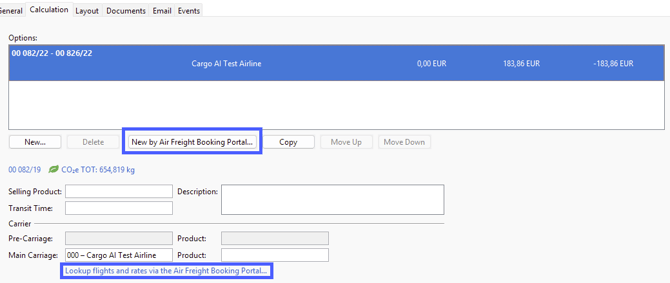
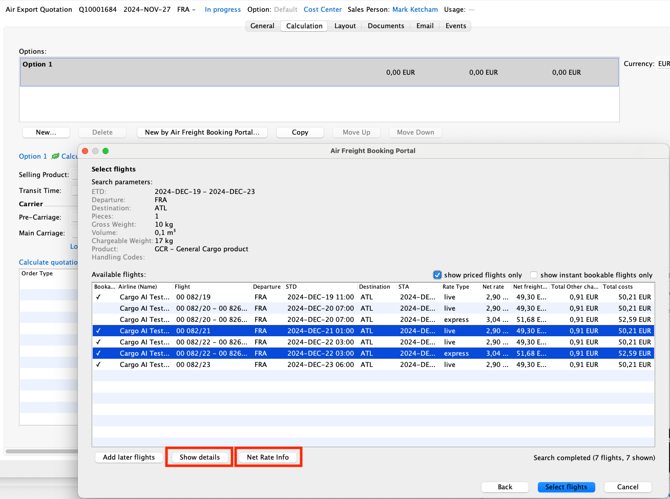
The Air Freight Booking Portal wizard invoked by this button/actions looks similar with some differences:
- Invoking from the multiple quotation options activates a multi-selection mode, which allows to select multiple entries via operating system shortcuts, see keyboard and mouse shortcuts
- The wizard in the quotation module does not provide an option to really book flights (as when invoked from a shipment) but updates or creates the offer option with flight and rate information
- The “Net Rate Info” button allows quick access to existing maintained net rate information for to allow comparison with the offered ad hoc capacity and rates.
For detail about Air Freight Booking Portal wizard search pane, see How do I use the Air Freight Booking Portal in Shipments.