
Requirements
- The invoice needs to have the status finished
- You need to have the permission to cancel invoices
- Open your invoice
- Click on the Cancel button in the top bar.
- If you do not see the Cancel button, you might be lacking the permission for this. Please consult your Scope admin user.
Example use case
Recipient needs to be changed after finalization
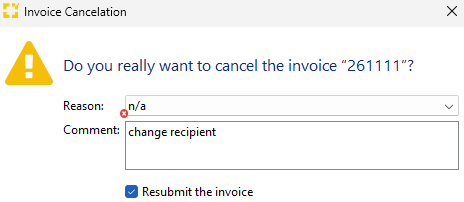
Financially relevant information can no longer be changed once an invoice has been finalized. If the recipient needs to be changed afterward, the only option is to cancel the invoice and use the “Resubmit the invoice” option.
-
The invoice is resubmitted unchanged and can then be edited.
-
The original invoice number cannot be reused. A new document number is assigned both to the cancellation and to the resubmitted invoice. Invoice numbers must remain consecutive.
-
When the invoice is canceled, the original invoice is automatically marked as paid. The resubmitted invoice can then be marked as paid manually. It is also linked to the original invoice. To view this link in the invoice editor, use the keyboard shortcut Ctrl + I.