
Making a New Salesperson Allocation
Requirement:
Before you can create a salesperson allocation, you must first create a salesperson in Scope. For instructions, see the following article: How do I set up salespersons and create reports about their business performance?
Go to Master Data > CRM > Salesperson Allocations
- In the application, select “New” at the top menu bar.
- Fill in the fields for the new sales person:
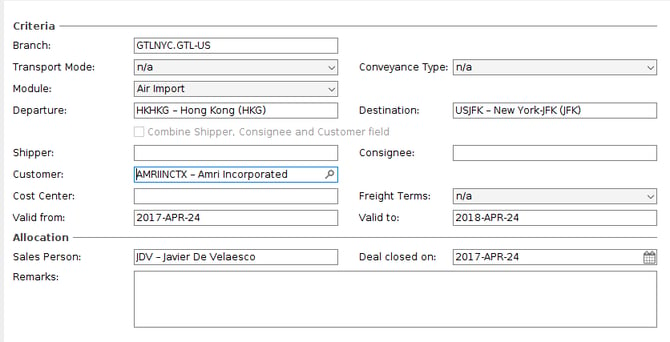
- Branch - If the sales associated with the salesperson and to be restricted to shipments from a single branch, then enter the branch name. If the salesperson gets allocated shipments from any branch, then leave this field blank.
- Transport Mode - Use this field to limit the sales allocated to the salesperson to either imports or exports. Leave it blank if it does not apply.
- Conveyance Type - This field can be used to restrict sales for the salesperson to air, sea or road shipments. Leave it bank to apply any of these modes to the sales person.
- Module - This field can be used to restrict the sales for a salesperson to a specific mode, air imports, air exports, sea imports, sea exports etc. In this example this salesperson only gets allocated air import shipments.
- Departure and Destination - These fields can be used to restrict the sale person's sales to lanes. In this example this salesperson only gets sales of shipments from Hong Kong to JFK. Leave blank if lane restrictions do not apply.
- Shipper/Consignee/Customer - Use this field to specify which partner belongs to this salesperson. In this example, any shipment where the customer is “Amri Incorporated”, is allocated to this sales person.
For more specific allocation criteria, clear the checkbox and specify the shipper, consignee and customer separately. - Cost Center - only use this field if the salesperson is to be allocated only shipments belonging to a particular cost center.
- Freight Terms - Use this field to apply the kind of freight terms on shipments that belong to this sales person
- Valid from and Valid to - These dates will control the period for which these shipments are allocated to this sales person
- Salesperson - set the salesperson for this allocation.
- Deal closed on - the agreed start date of the contract
- Remarks - additional information about this allocation.
3. Now save this new allocation.
Automatic and manual assignment
Each time a shipment or quotation is saved, Scope determines the most suitable salesperson. The assignment is based on the customer, shipper and consignee and remains in effect until the shipment reaches the financial status “Invoiced” or the quotation reaches the status “Closed”.
In the Shipment Overview under Extras>Allocate Salesperson you can assign or correct sales persons for all shipments (regardless of their financal status) that are matching your current filter criteria and do not have an economic date older than three months.
If a salesperson is assigned manually, the automatic assignment is deactivated for that shipment/quotation. You can assign the salesperson manually as follows:
- In the shipment, using the keyboard shortcut Ctrl + I
- In the quotation, by clicking the activity person in the status bar (action link)
If a quotation or shipment is copied, Scope removes the assigned salesperson and runs the check again to determine the best match. This allows you to reuse older quotations without keeping a potentially outdated salesperson assignment.