You can optionally enter a reference here, such as the bank transfer reference used for the payment.
Finance > Payments(Invoices)
To use the "Payments (Invoices)" module, it must be activated.
If the table does not display any documents, the module is not activated. Please contact our Customer Service team.
When you open the "Payments (Invoices)" module, all incoming and outgoing documents that you have already finalised in Scope are displayed.
|
Typ |
Bedeutung |
| OI | Outgoing Invoice |
| OC | Outgoing Credit Note |
| II | Incoming Invoice |
| IC | Incoming Credit Note |
| Coll.I | Collective Invoice |
| Coll.C | Collective Credit Note |
To register a payment for the full amount of a document, select the row and click on "Payment" at the top. Make any necessary changes in the "New Payment" window, then click OK to complete the payment registration. The document is now fully paid in Scope.
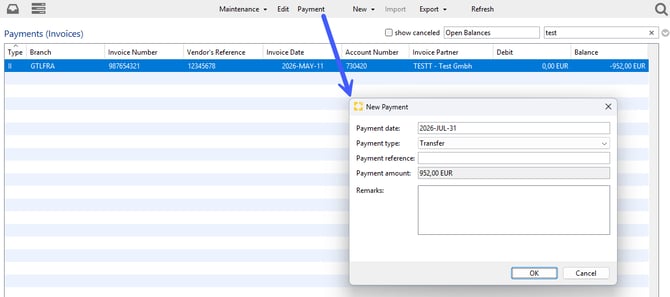
Payment date: By default, the current date is set.
Payment type: By default, the payment method selected in the Payments module settings is used here. Click the drop-down menu to manually select a different payment method.
Payment reference: You can optionally enter a reference here, such as the bank transfer reference used for the payment.
Payment amount: The document’s outstanding balance is displayed here. If you want to register only a partial payment, see the section below for instructions.
Remarks: You can enter a remark here if needed.
Payment Details and Partial Payments
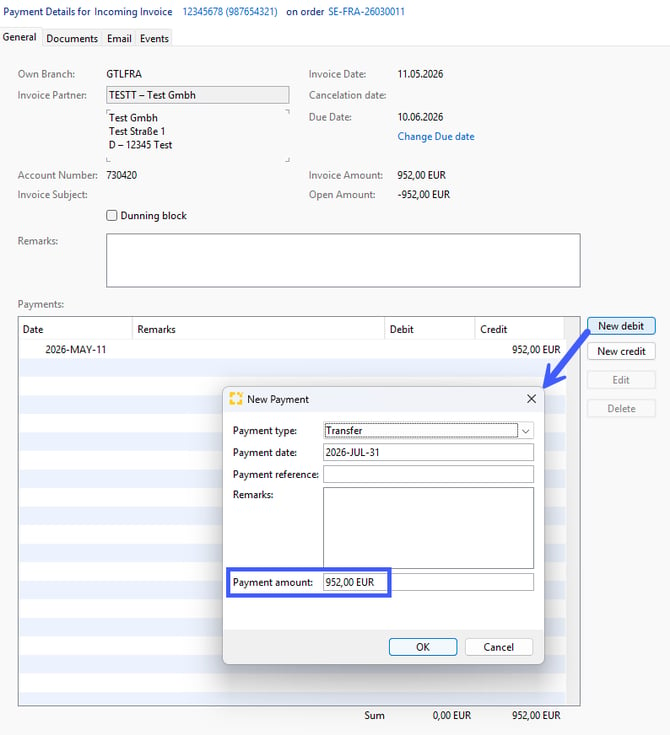
To view the payment details for a specific document, double-click the document in the table.
If you want to register only a partial payment for a document, you can do this as well here in thepayment details view.
To do so, click "New debit" or "New credit" on the right, depending on the document type. The "New Payment" window contains the same fields as the payment registration described above, with the difference that you can adjust the payment amount here.