
In some cases, you may try to select one of your partners as the import or export agent for a shipment, but the partner does not appear to be available when you start typing. Here is an example:
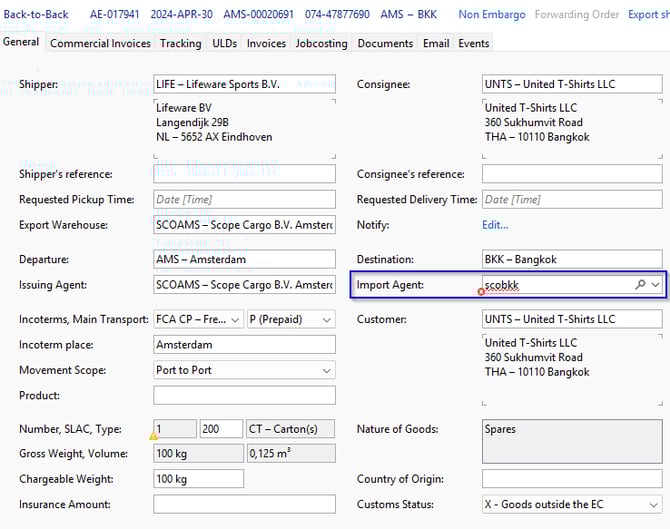

To select a partner as an agent, they must be assigned the Agent role, have a star rating of at least one, and have the relevant port(s) configured.
1. Add a star rating on the agent role of a partner
When the Agent role is assigned to a partner, the Agent automatically receives a default 1-star rating. The star rating determines the order in which agents are displayed in the search results. The higher the rating, the higher the agent appears in the list. An agent with 5 stars appears at the top.
If the star rating is manually removed (zero stars), the agent is deactivated. A deactivated agent is no longer visible in the search results and cannot be selected.
- Navigate to: Master Data > Partner
- Search for the partner you want to use (in this example: Scope Cargo International Bangkok)
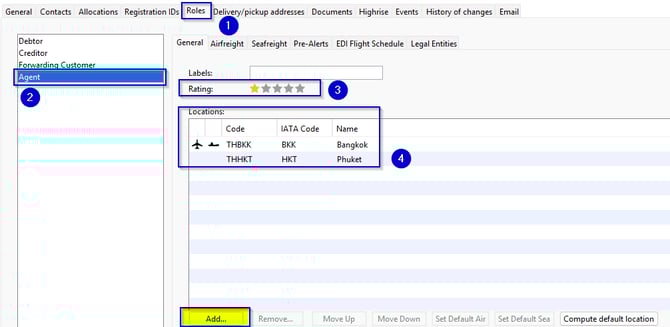
- Steps 1 and 2: Navigate to Roles tab, and select Agent.
- Step 3: You now see the screen below, and you can give the agent the star rating of your choosing. The default is set to one star.
- Step 4: Make sure you have added the agent locations as well. If there is no agent location entered, you can add one using the Add button.
- When you have rated the agent and added the agent locations, simply click Save and proceed with your shipment.
2. Add UN/location code
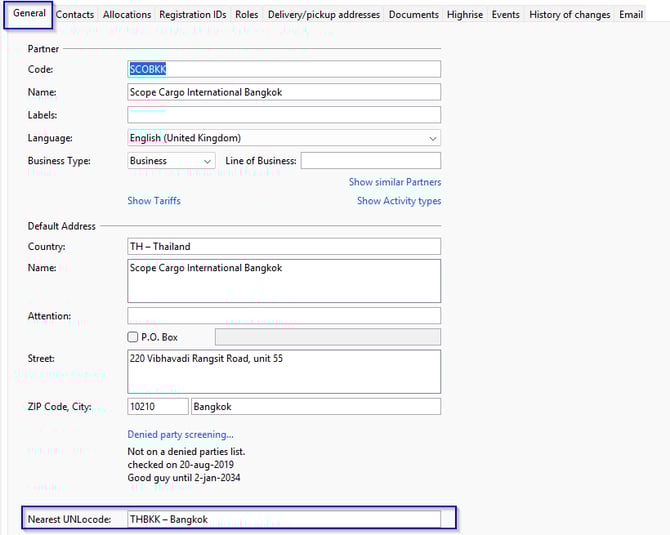
A red validation can also occur if the Nearest UNLocode is not entered on the partner.
- Navigate to: Master Data > Partner
- In the General tab, you can enter the Nearest UNLocode. See the example below:
- Make sure all required agent locations are available on the role Agent. If a location has not been configured yet, you can simply add it using the Add button.