
Complete the following three configuration steps to ensure that your outgoing invoices show the invoice recipient to pay the factoring company you have appointed.
1. Create a partner record for the factoring company
Create a partner for the factoring company with whom you have an assignment agreement. You do not need to assign a specific role.
2. Enter the factoring company’s bank details
Go to Settings > Finance > Accounting and under Master data click Edit Bank Accounts.
Follow the steps in the article How do I manage (our own) bank accounts in Scope? and make sure to select the checkbox “Account owner is deviating payee”.
3. Add an assignment clause
Go to Settings > Finance > Accounting and under Master Data click Edit Invoice Notes.
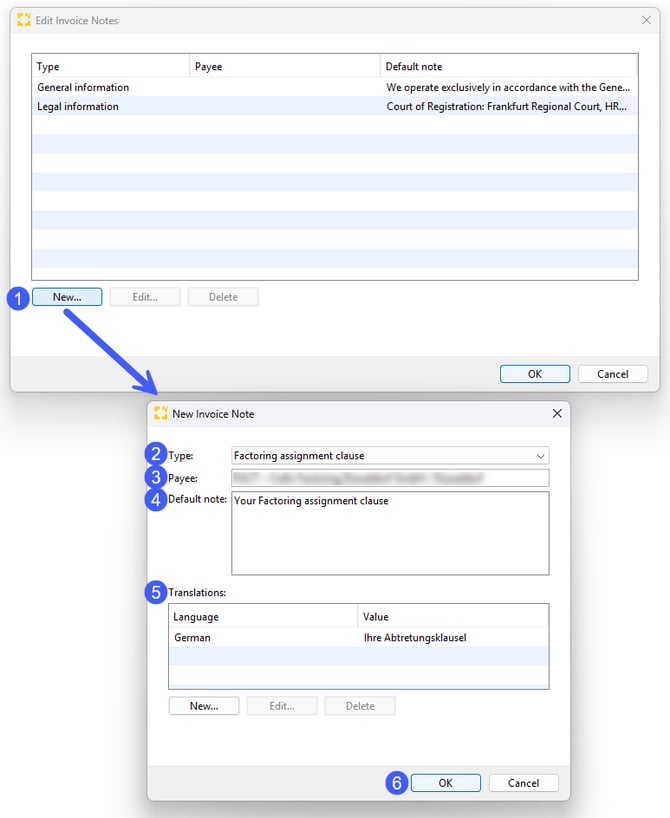
In the new window, click new (1) below the table to create an invoice note. Select “Factoring Assignment Clause” as the type (2), then select the partner you previously created for the factoring company as the payee (3).
In the default note field (4), enter the assignment clause you want to appear on your outgoing invoices.
You can also add translations (5) in other languages.
Click OK (6) to confirm your entries.