
CRM > Customer and Prospects
Overview:
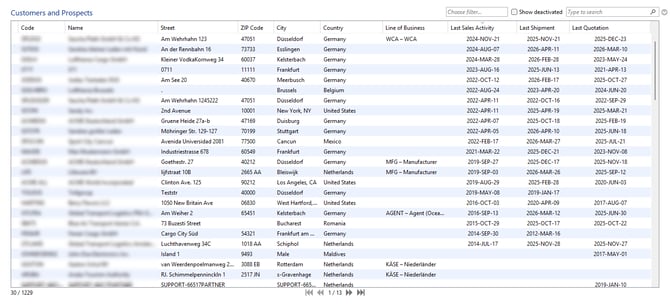
The overview only displays customers and prospects. Partners are automatically classified as such if a shipment, quotation, or sales activity (CRM > Activities) has been created for them, or if a line of business (in the partner module) has been assigned to them.
This means that not all partners are necessarily included in this overview.
As usual, filter criteria are available above the table to simplify your search, and you can adjust the columns to maintain a clear overview (right-click on the table head).
When you open a customer or prospect, various details are available in different tabs.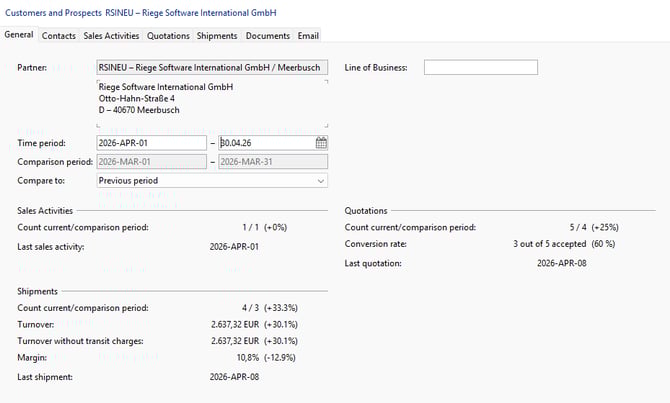
General
Overview of the business partner, including line of business, sales activities, quotations and shipments. The currently selected time period is then compared with the corresponding comparison period.
Contacts
The contacts displayed here are taken from the partner and can only be added or edited there.
Sales Activities
Overview of sales activities with the partner for the selected period. You can switch to the Sales Activities module by double-clicking on the selected row and edit this sales activity.
Quotations
Overview of quotations to the partner for the selected period. You can switch to the Quotations module by double-clicking on the selected row.
Tip: The columns in the Quotations tab can be customized to individual needs with a right-click, just like in the Shipment overview.
Shipments
Overview of the partner’s shipments for the selected period. The financial key figures are compared with the comparison period. You can open a shipment by double-clicking on the selected row.
Tip: The columns in the Shipments tab can be customized to individual needs with a right-click, just like in the Shipment overview.
Documents
The documents displayed here are taken from the partner module. In addition, documents can be deleted, added, and edited right here.
Email
The emails displayed here are taken from the business partner. You can also compose and send new emails right here.