
When creating a new ZIP Zone Schema, you might get below error message (1) in Scope.
You then check all partners (2) for whom a schema already exists but cannot find the mentioned partner there.
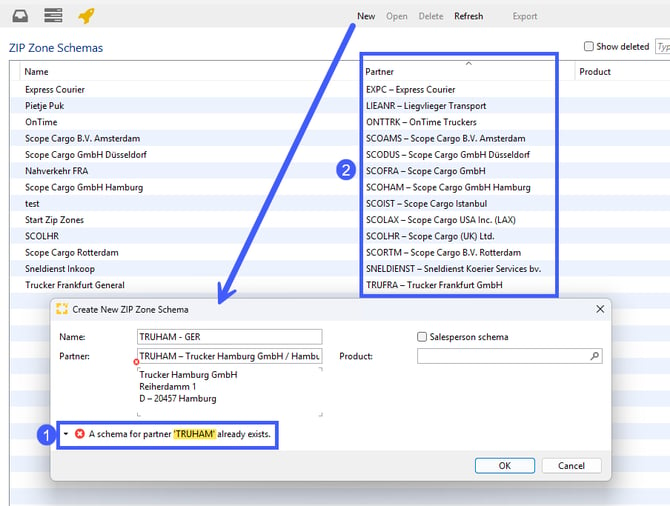
This can only mean that a schema for this partner got deleted and still exists, but is not visible to you at first glance.
Tick the checkbox “Show deleted” (1) right above the table to also see deleted ZIP Zone Schemas in the overview, marked with a trash can symbol (2).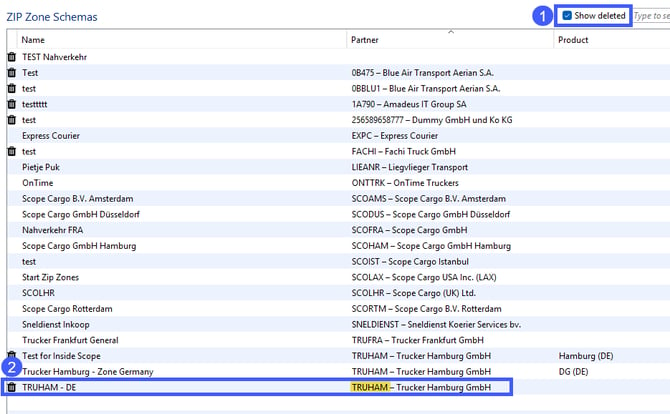
Double-click on the highlighted row and confirm the pop-up question, by clicking on “restore”.
The ZIP Zone Schema will be opened automatically, and you can modify it as you like.