
| Type of Report | Description |
|---|---|
| CBS Report | List of all shipments by transport mode with income and cost. Needed in some countries to report these figures per transport mode to the government (for statistical purposes). |
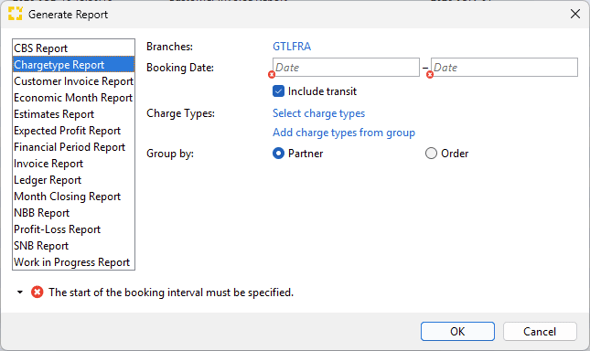
| Chargetype Report | List of turnover per chargetype and invoicing partner (both payables and receivables). This allows to identify services where the company earns or losses money on and therefore gives an indication where adjustments to selling rates might be advisable. |
| Customer Invoice Report |
List of invoices to a certain partner including payment details related to the particular invoice. It allows an evaluation of the given partner with regards to his turnover and in particular his payment morale. Hence, allow possible danger to the financial situation, e.g. regarding partners with high turnover but low payment morale. |
| Economic Month Report | List of turnover per economic month and branch. This will allow to evalute each branch's financial status in particular in comparison to previous months. |
| Estimates Report | List of open estimates, i.e. items that are calculated based on stored buying or selling rates or manual entry by a user but that are not part of a finalized invoice. They are not current financial figures with regards to accounting but need to be evaluated to get a clear picture of the branch's financial situation. |
| Expected Profit Report |
Report on the variance between expected and actual profit. |
| Financial Period Report |
Evaluate actual financial figures (i.e. finalized invoices) per shipment. It delivers a breakdown of the financial figures in the given period. |
| Invoice Report | List of all finalized invoices. |
| Ledger Report | Evaluate the turnover per general ledger to evaluate profitable and less profitable parts of the company. |
| Month Closing Report | Overview financial figures, both actuals (finalized invoices) and estimates (open invoices). Apart from the general financial figures for the given month, it shows open receivables that will be billed in the coming month but relate to transactions performed in the given month. It will show furthermore all cost estimates where no actual payable has been received yet, hence costs that will occur in the following month but relate to transactions performed in the given month. |
| NBB Report | List of payables and receivables per invoicing partner and their respective turnover. This will allow to evaluate the turnover of certain partners and to identify increase/ decrease in business with given partners. |
| Profit-Loss Report | List of profit or loss per shipment. Filter criteria allow easily to identify shipments where the company made a loss and by analyzing the respective shipments to identify possible patterns for non-profitable transactions. |
| SNB Report | List of invoicing partners (both payables and receivables) per shipment and their respective turnover. This will allow to evaluate the turnover of certain partners and to identify increase/ decrease in business with given partners. |
| Work in Progress Report | List of all payables and receivables (actuals and estimates) on open shipments. It delivers a financial overview of all transactions that are still being worked on by operations. |