Introduction
In addition to the main carriage costs, Scope reconciles all cost types associated with the relevant activity type, such as pickup costs and delivery to the terminal.
Important: Rate sheets work only when the appropriate activity types and rates are available. In this case, no specific cost center may be defined for these activity types because a rate sheet does not have a cost center.
Open the application via the following menu path: CRM > Rate Sheet Templates.
Use the New option in the header menu to create a new template, or double-click an existing template to open it: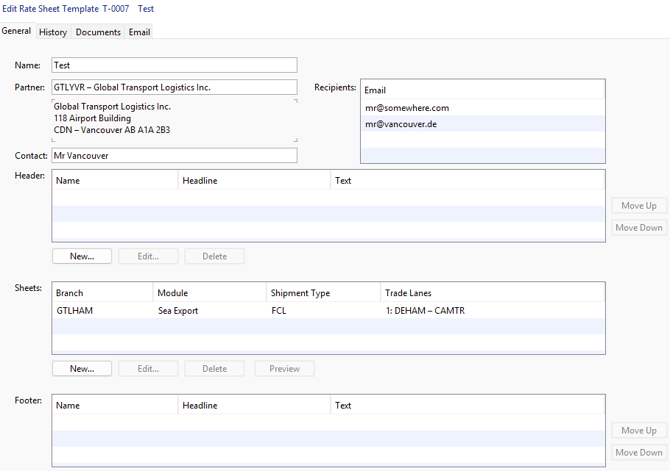
Description
| Heading | Description |
|---|---|
| Name | The title used to label the rate sheet templates in the overview |
| Partner | The business partner whose code is used to assign the corresponding rates |
| Contact | A contact person with an associated email address |
| Header/Footer | Use Master Data > CRM > Rate Text Blocks to maintain templates for your headers and footers. These may include information such as general terms and conditions or excluded services. |
| Sheets | Select from the Air Freight Import/Export and Ocean Freight Import/Export modules—FCL or LCL—and specify a branch as the basis for calculating your rates. Define a “new sheet” for each module, with each sheet generating a separate document. This allows you to centrally represent multiple processes for a business partner in a single template. 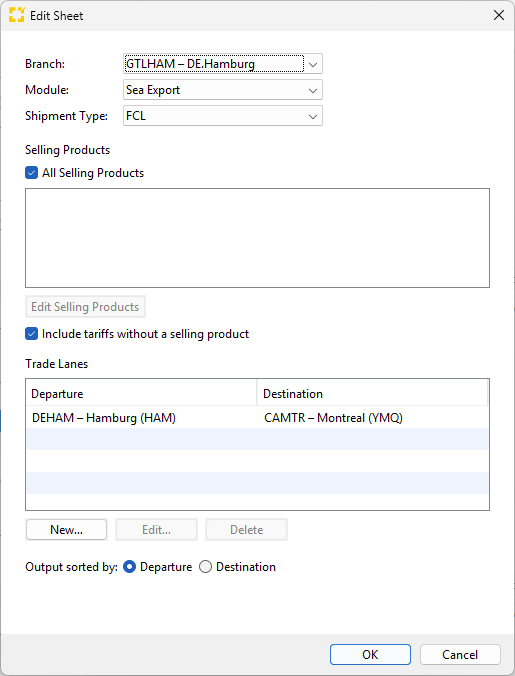 |
| Preview | Use this button to preview the selected sheet. |
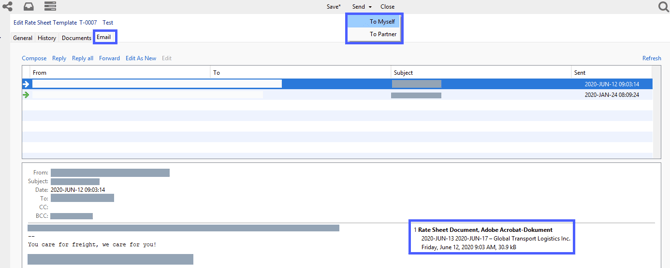
| Send | When you send your rate sheet template, all sheets are also attached as separate files. You can send it either to yourself first (“To myself”) or directly to the business partner (“To partner”). |