
- Navigate to Airfreight > Import Shipments.
- In the top menu, click New and then select Master Shipment.
- The input screen for the new consolidation shipment will open.
- Complete at least all the required fields (marked in red).
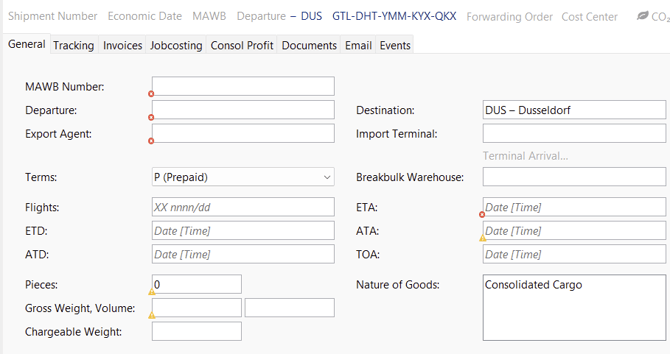
- Create the individual house shipments using New function.
In addition to this option, you may also choose New from Template, New from Quatation or New from Selection. After creation, all house shipments will be listed in the overview section below. You can also Edit, Delete each individual house shipment, as well as Reassign it or Deconsolidate.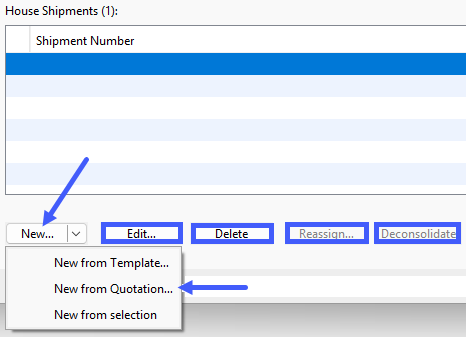
- The dialog window New Consolidated House Shipment will open. Enter all relevant House data and complete at least the required fields (marked in red).
Once all mandatory fields are filled in, you can open the shipment using the Proceed with Shipment Entry button.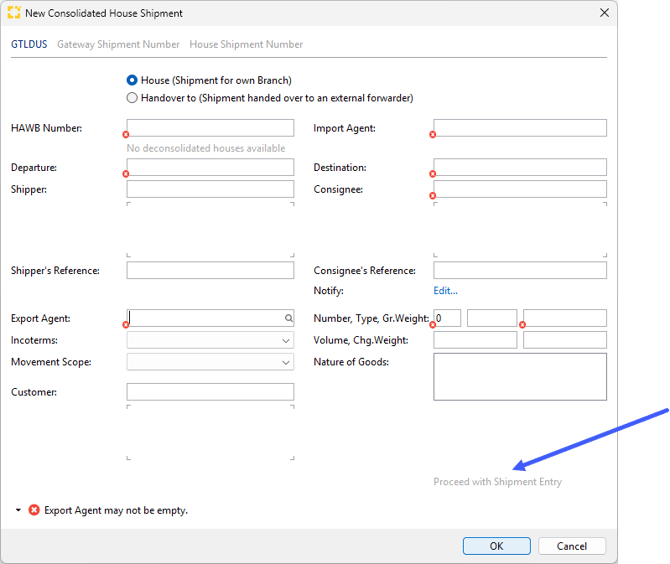
- The House file will now open. You can manage it in the same way as a back-to-back shipment for example and generate delivery order as well as any subsequent processes.