
Typically, only those with access to both Scope and the accounting system are granted permission to manage payment terms.
How are payment targets created or changed?
You can find the action links under Settings > Finance > Accounting ... Master data.Click on Edit Debtors Payment Terms for customers or Edit Creditors Payment Terms for vendors to open a new window with the desired options:
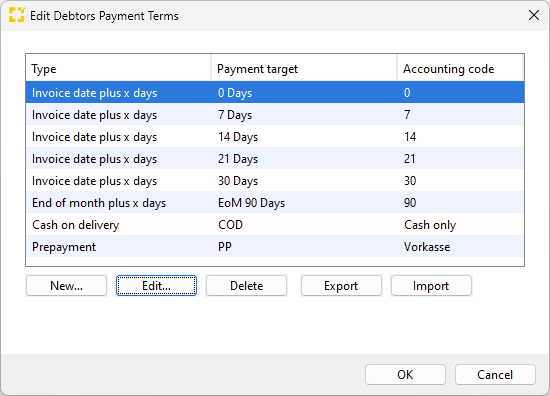
Type: How Scope should calculate the payment target dynamically. The options are:
- Invoice date plus x days (example: invoice 15.07. plus 5 days: payment target 20.07.)
- End of month plus x days (example: invoice 15.07. plus 5 days: payment target 05.08.)
- Cash on delivery: Payment target corresponds to invoice date
- Prepayment: Payment target corresponds to invoice date
Payment target in days: Value for calculating the payment target
Accounting code: This field is optional. If payment terms are included in files for the accounting system, the corresponding value of the accounting system should be set up within Scope.
Print text: Localizable text for printing on the invoice. Not a mandatory field.
Application of the payment target in the debtor or creditor role
Go to Master data > Partner and open the entry for a partner. On the Roles tab, select the Debtor role (or add it).
In the Debtor role, on the General tab, specify the payment target via the drop-down menu. There, you can also set a separate payment target for customs duties.
These settings only apply to the respective business partner in
which the role is active. In the Debtor role, the payment target is a mandatory field. Accordingly, payment terms must be defined before debtors can be created in Scope.
Can Scope automatically specify a payment target for new customers or vendors?
It is possible to automatically set a payment target for customers and vendors
automatically, when the role is assigned to the business partner for the first time.
This setting is currently only available to the Riege Software Service, please contact them via F12 in Scope if you want this setting.